If your games stutter on first launch and then run smoother the second time you play, that’s not a bug, it’s usually a known and predictable side effect of how modern PC games handle shaders. This guide breaks down exactly why that first session feels rougher than the ones after it, and what you can actually do to cut it down.
Shader Compilation Stutter: The Main Culprit
The number one reason games stutter on first launch is shader compilation. A shader is a small program that tells your GPU how to render a specific visual effect, lighting, reflections, particle effects, and so on. Modern games contain thousands of these shaders, and many of them need to be compiled into a format your specific GPU and driver combination can run efficiently.
On consoles, this compilation often happens ahead of time because the hardware is fixed. On PC, there are thousands of possible GPU and driver combinations, so a lot of that compilation has to happen on your machine, the first time a shader is actually used in gameplay. This is well documented as shader compilation stutter, and it’s especially common in games built on DirectX 12, which shifts more of this compilation work to the player’s own hardware compared to older graphics APIs. That’s why the stutter tends to hit hardest during a first playthrough, especially the first time you enter a new area, encounter a new enemy, or trigger a new visual effect.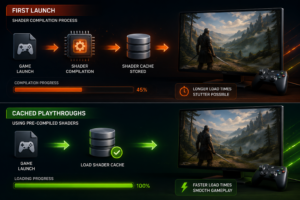
[Suggested image: Diagram showing shader compilation happening in real time during first gameplay vs cached on subsequent runs, alt text: “Shader compilation process on first launch versus cached playthroughs”]
Traversal Stutter vs Shader Compilation Stutter
Not all stutter comes from the same source, and it helps to know the difference.
| Type | Cause | When It Happens |
|---|---|---|
| Shader compilation stutter | New shaders being compiled in real time | Mostly on first launch, fades after a shader cache builds up |
| Traversal stutter | Game streaming in new assets as you move through the world | Can happen every playthrough, tied to storage speed and CPU |
| Driver-related stutter | GPU driver not yet optimized for that specific title | Common right after a new game launches, improves with driver updates |
| Background process stutter | Other software competing for CPU or disk resources | Can happen at any time, unrelated to first launch specifically |
Shader compilation stutter is the one most tightly linked to first launch specifically, since the shader cache is empty and has to be built from scratch.
Why It Usually Gets Better After the First Session
Once your GPU compiles a shader, most games and drivers cache the compiled result on your disk. The next time that shader is needed, whether that’s later in the same session or the next time you launch the game, it can pull from the cache instead of compiling it again. That’s why games stutter on first launch far more than they do afterward. Some games even include a dedicated shader pre-caching step during install or first boot specifically to shift this cost earlier, before you’re actually mid-combat or mid-cutscene.
Other Reasons Games Stutter on First Launch
Shader compilation is the biggest factor, but it’s rarely the only one. A few other things commonly stack on top of it during that first session:
- Background indexing or updates. Steam, Windows, or antivirus software running disk scans in the background can compete with the game for resources right after install.
- Slow storage. Games installed on a hard drive or a slower SATA SSD take longer to stream assets, which can compound traversal stutter on top of shader stutter.
- Outdated GPU drivers. If a driver hasn’t been updated recently, it may not have title-specific optimizations that reduce the same shader compilation overhead.
- Thermal throttling on a cold system. Less common, but a GPU or CPU running conservative clocks at the start of a session can contribute to inconsistent frame times.
How to Reduce Stutter on First Launch
- Let shader pre-caching finish before playing. If a game shows a “compiling shaders” or “optimizing” screen, let it complete rather than skipping ahead.
- Update your GPU driver before launching a new game. A Game Ready or Day-0 driver often includes shader and compatibility fixes specific to that title.
- Install games on an SSD rather than an HDD. Faster storage reduces the traversal stutter that often overlaps with shader compilation during a first playthrough.
- Close background applications before your first session, especially cloud sync tools, antivirus scans, or other downloads.
- Expect and accept some first-run rockiness. In many titles, stutter noticeably drops off after the first 20 to 30 minutes as the shader cache fills in.
If you’re shopping for storage upgrades to cut down on this kind of stutter, our SSD and storage reviews cover current options for gaming rigs.
Should You Skip the Shader Pre-Caching Screen?
| Waiting for Pre-Caching to Finish | Skipping Straight into Gameplay |
|---|---|
| Pro: Stutter is front-loaded into a loading screen instead of gameplay | Pro: You start playing sooner |
| Pro: Combat and cutscenes stay smoother in the first session | Con: Shader compilation still happens, just mid-gameplay instead |
| Pro: Better experience for competitive or first-impression play | Con: More noticeable frame time spikes during actual play |
| Con: Adds a few extra minutes before you can start | Con: Can make a game feel buggier than it actually is |
The Bottom Line
Games stutter on first launch mostly because shaders are being compiled for your specific hardware in real time, not because something is wrong with your PC. It typically fades once the shader cache builds up, and updating your driver or installing on faster storage beforehand can soften that first session even further.
FAQ
Does every game stutter on first launch?
Not every game, but it’s common in titles with complex shader-heavy visuals, especially those using DirectX 12 or Vulkan, which shift more shader compilation to the player’s machine compared to older APIs.
Will upgrading my GPU fix first-launch stutter?
It can help since a faster GPU compiles shaders quicker, but it won’t eliminate the stutter entirely. The underlying cause is compilation happening in real time, not raw GPU power.
Why does the stutter come back after a Windows or driver update?
Some driver and OS updates clear cached shader data, which forces the game to recompile shaders the next time you play, temporarily reintroducing the same first-launch stutter.
Is shader compilation stutter the same on all platforms?
No. Consoles typically precompile shaders ahead of time since the hardware is fixed, which is part of why the same game often feels smoother on console at launch than on a wide range of PC configurations.
